Import Markdown and Convert it to Structured Content Automatically

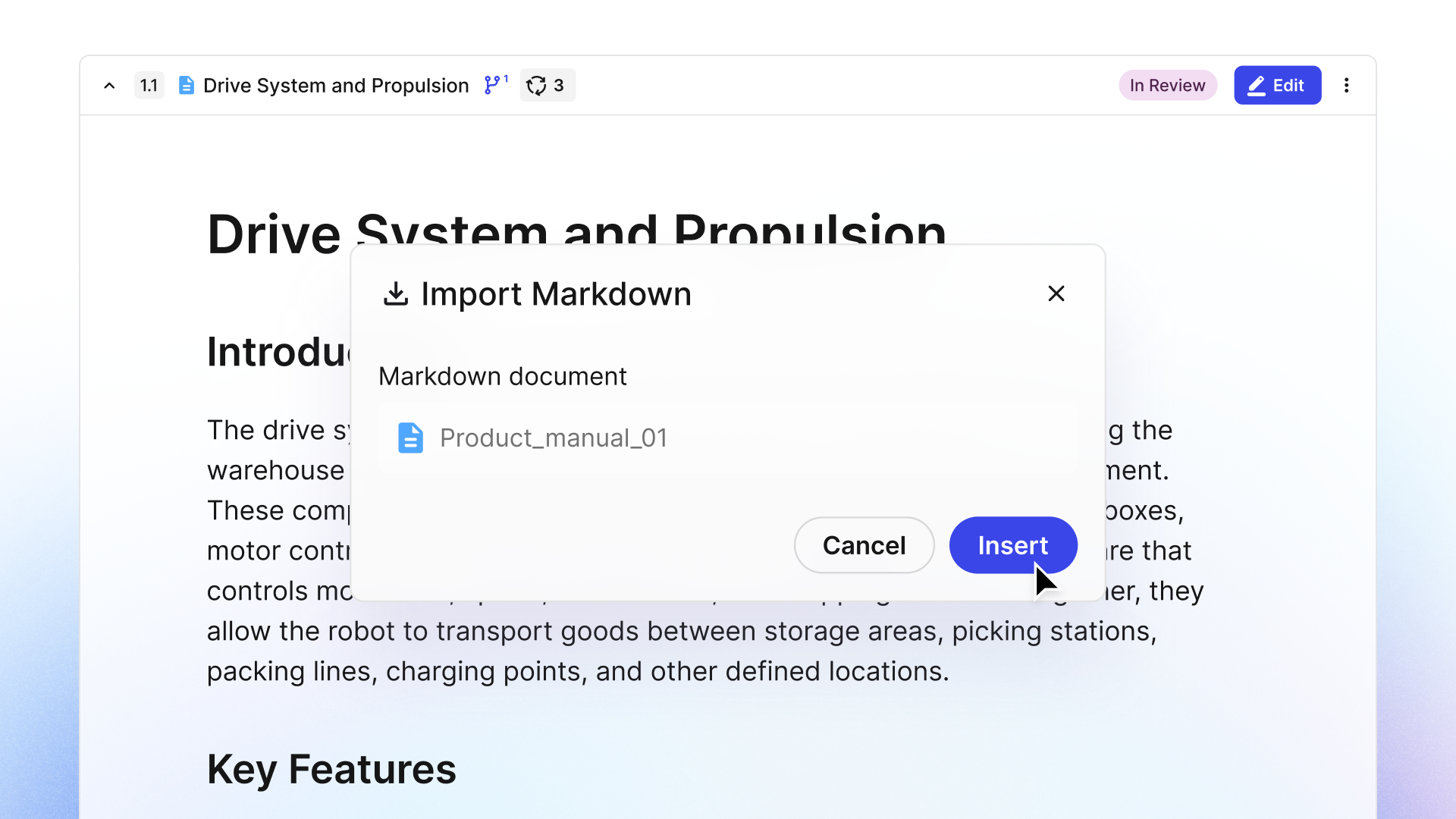
Documentation teams increasingly receive content in Markdown, whether from developers, AI tools, or external contributors. But getting it into a structured content tool like Paligo often requires a lot of copy/pasting, reformatting, and rebuilding metadata – a manual process that is time-consuming and prone to errors. Teams need a better way to manage Markdown content.
Paligo’s new Markdown Import feature solves these challenges. The result is a migration feature that enables doc teams to automatically convert Markdown files into structured content in a single operation, without losing any existing structure or metadata.
Let’s dig into this new feature.
What is Markdown?
Markdown is a widely used format for creating technical content. Initially used by developers and engineering teams, its use is also growing rapidly among other teams in organizations, especially those focused on AI initiatives.
Markdown is a lightweight markup language that lets writers apply formatting with plain-text symbols. Due to its simplicity, Markdown files are rendered consistently across devices and platforms and are a natural starting point for many documentation teams.
If you’ve ever installed software, you should remember the README files that explained how to install it. That’s Markdown. Markdown is also used by developers to store code documentation (like API documentation) directly in the source repository.
The most common form of Markdown is GitHub Flavored Markdown (GFM), but many organizations have created extensions or customizations to the base specification (called flavors) to support granular formatting requirements.
Another reason Markdown is popular is that it’s easily consumed by AI tools. Anyone who writes prompts for LLMs like ChatGPT or Claude will recognize the Markdown format, as it’s used to provide additional context to the AI. Many AI tools also produce content in Markdown format.
The Challenges of Working With Markdown in Paligo – Before
Documentation teams that support Markdown and use Paligo faced challenges bringing this content into the CCMS. It was a completely manual, error-prone process in which writers had to copy and paste Markdown into a topic. Once pasted, they had to reformat the content and rebuild the metadata.
For example, a documentation manager at a SaaS company wants to migrate 300 pages of GitBook documentation, written in Markdown, to Paligo. The manager asks her team for an estimate, and they respond with six-plus weeks, which will involve copying and pasting the content into Paligo, manually restructuring it, and cleaning up the metadata. All that work has to happen before a single page is published. The manager deprioritizes the project.
Because of the effort involved with migrating Markdown and the risks associated with copy/pasting and making changes, Paligo was not widely adopted for Markdown documentation. Instead, teams work with multiple tools, each handling a different type of content. Those who continued to work to bring Markdown into Paligo’s CCMS invested significant time and effort and had to work around errors.
Now, consider this example: The same documentation manager uploads her GitBook export as a Markdown archive to Paligo. The import runs, and the content is automatically in Paligo’s editor, structure intact, ready for her technical writers to review and enrich. A migration that would have taken six weeks now takes an afternoon.
This is what Paligo’s new Markdown import feature does. It removes the barrier to migrating Markdown quickly and easily into Paligo’s component content management system (CCMS).
Introducing Markdown Import – How It Works
The markdown import feature supports both single-file and multi-file GitHub Flavored Markdown (GFM) in one operation. It’s not a simple file reader like some other import tools. Instead, it converts Markdown into Paligo’s native Docbook structure, mapping content to Docbook elements rather than storing it as raw text. The import process preserves semantic meaning wherever the two formats overlap and retains any available metadata, reducing post-import cleanup.
Initially, the Markdown Import function supports GFM, but the team expects to add new flavors and customizations as part of Paligo’s roadmap. The GFM import also supports most other flavors out of the box, with only minor gaps where a flavor has added significant features and the content uses those features.
With Markdown imported into Paligo, content can be reused, conditionalized, version-controlled, and published to multiple outputs, including HTML, PDF, XML, and Markdown (Paligo supports Markdown as an output as well).
Why You Want to Migrate Markdown to Paligo
Markdown is a popular format for technical content, but it has its drawbacks. It is inherently less semantically rich than Docbook, so you don’t have the semantic tagging you need for search or for AI tools. When you migrate Markdown into Paligo using this new Import feature, you preserve any structure and metadata that exists in the content, and you gain the possibility to add much more metadata than Markdown allows.
There are several reasons why migrating Markdown files to Paligo is useful. Customers who use AI to generate draft content can quickly import it into Paligo to leverage structured content.
For technical writers, it eliminates the blank-page problem. In the past, a tech writer would get a Markdown file, create a set of topics in a Paligo publication, and either copy and paste the Markdown content into the topics or write the content directly, reading from the Markdown file.
Now, thanks to the new import feature, writers get a clean foundation of content imported directly into the CCMS, with topics created automatically. The writer then opens the topics and makes any necessary changes, saving hours of manual reformatting.
It also enables developers to become a more integrated part of the documentation pipeline without having to learn to read or write structured content. They simply provide Markdown files to the doc team, and when they need to review content in Paligo, they can easily view it using Paligo’s Next-Gen Editor. No need to learn how to read or write structured content in Docbook XML.
Who else will find this feature helpful?
- Documentation Teams: Teams migrating from markdown-native tools have a clean, structured starting point without needing a big migration project.
- Documentation Managers: Managers who need to support Markdown as an input or output can now leverage the same tool (Paligo) that they use to manage all other documentation.
With the Markdown Import feature, writers and publishers increase efficiency, while documentation managers and team leads get a clear migration path that won’t cost a fortune and get teams up and running quickly. Not only does the import feature reduce migration effort, it also accelerates the onboarding of Markdown content into the content pipeline and speeds content publication.
The Benefits of Importing Markdown into Paligo
There are several important benefits of this capability that documentation teams will appreciate.
A One-Step Import
The import happens with a single step. There is no manual reformatting prior to import, and no existing structure is lost. This makes importing Markdown faster and more efficient, giving technical writers time to focus on more important aspects of creating and managing documentation.
Developers Have a Frictionless Way to Contribute
With more engineering teams starting to write documentation in code repositories using Markdown, this import feature ensures developers can continue working the way they want while also contributing to the documentation teams’ work. Developers become part of the team that creates highly structured content and makes it available across more channels and outputs.
No Big Migration Projects
Finally, documentation managers don’t have to plan a big migration project; instead, they make migration part of their regular workflows. This is not only a cost-saving measure but also a productivity improvement. Markdown content gets into Paligo faster, so technical writers can work on it, and it gets published faster. In industries where technical content must change quickly to keep pace with product changes, this is a major win for doc teams.
Accelerate AI-Assisted Content Workflows
Many AI tools generate Markdown content by default, and many documentation teams are now using AI assistants to help them create initial draft content. Now, instead of having to copy, reformat, and restructure that content in Paligo CCMS, teams can migrate it into Paligo, where it’s converted into structured content and becomes part of a governed, structured content workflow.
Bringing Markdown into a Structured Content Workflow
Markdown remains a widely used format for technical documentation, but managing it at scale can create challenges around reuse, governance, and multi-channel publishing.
With Paligo’s new Markdown Import feature, those barriers are removed. The feature automatically converts Markdown into structured DocBook content, where it can then be versioned, reused, and published to multiple channels and outputs (including Markdown).
This feature not only supports technical writers who regularly work with Markdown content, but also enables closer collaboration with developers and engineering teams and saves documentation managers time and budget on large migration projects.
You can find out more about the new Markdown Import feature here.
Get started with Paligo
Paligo is built to meet the most demanding requirements, with plans made for any company from the growing SMB to the large Enterprise.
Get the Paligo Pulse once a month.
Stay ahead in structured content
Share
Author