8 Best Practices Required to Manage Formal Knowledge in a CCMS

Formal knowledge breaks down fast without structure. Teams duplicate content, policies change across departments, and conflicting versions of standard operating procedures complicate matters. You only need to look at the failed implementations, content chaos, or wasted resources that happen when you don’t have a plan that includes understanding your content
A CCMS changes that, but only when the underlying content operations is designed intentionally. Structured content, governance, taxonomy, reuse, and publishing workflows aren’t administrative overhead. They’re the foundation for scalable, trusted knowledge operations.
Successful CCMS implementations require content operations that include best practices to help you understand your content and how best to create, manage, and publish it. At a recent KMWorld London event, Mark Pepper, former Information Architect and Project Manager at Paligo, shared these 8 best practices for content teams to follow when managing formal knowledge in a CCMS, and we’re sharing them here with you.
Why a CCMS for Formal Knowledge?
You use a CCMS to create, manage, and publish structured content. It follows a structured content authoring model that is more rigorous than what you would expect in a typical knowledge-sharing environment. This makes a CCMS more suitable for formal knowledge such as policies, standard operating procedures (SOPs), or official facts.
Yes, there are other tools, such as SharePoint, Zendesk, and ServiceNow, that can store and manage knowledge, but they don’t follow a structured content model. They also have repositories that are low to moderate in complexity, and for some companies, they are sufficient. But if you’re looking for an option that gives you the features and functionality needed to manage your formal knowledge in a way that makes it consistent, accurate across publishing channels, compliant, and well-governed, you need a CCMS.
Here’s a quick look at the best practices:
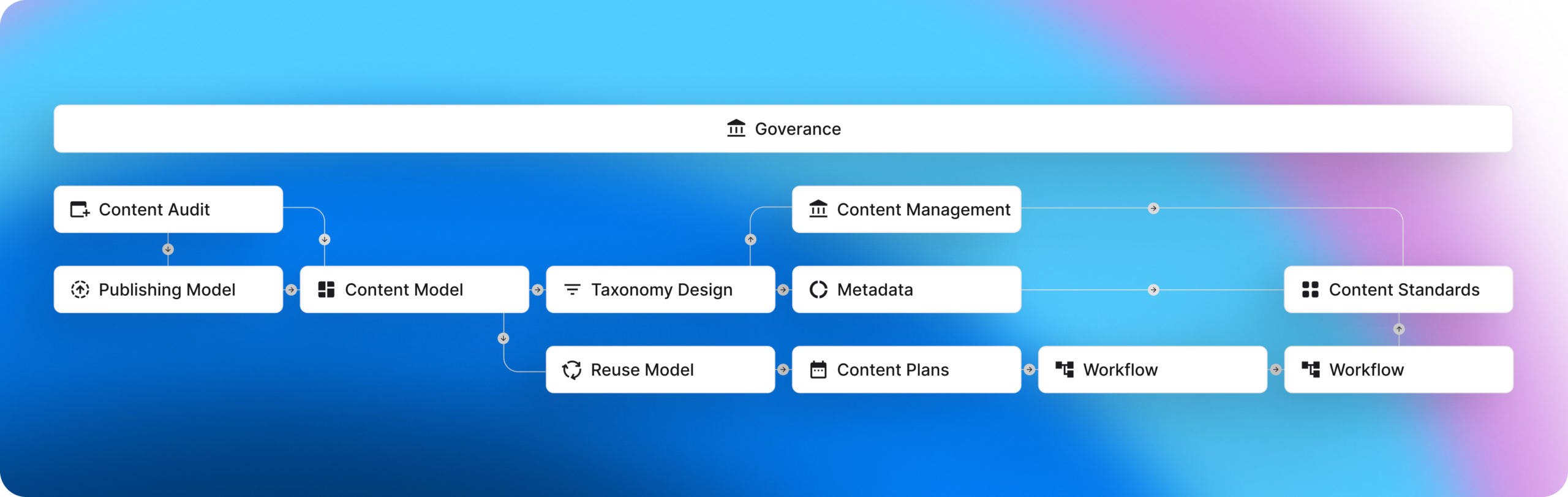
Let’s look at each piece in more detail.
1. Conduct a Content Audit
The first step in building your strategy for managing knowledge is to conduct a content audit of what you already have. An audit helps you understand content structure and reusability, and makes it much easier to create other best practices (such as the Content Plan or Taxonomy Design).
Create a spreadsheet that includes the following columns:
- Publication Name
- Description
- Where it lives
- Who owns it
- Last Updated
- Duplicates/Variations (Are there copies of this publication? Note what they are, where they reside, and who owns them)
- Primary Source? (Is this the primary source of this content?)
- About your content: model, taxonomy, metadata
- Should this content be included in your plans?
The benefits of the content audit are multiple. It helps you identify all the content you need to include in your Content Plan, provides elements you use in your Content Model, and includes keywords for Taxonomy Design and Metadata.
Without a content audit to work from, you’ll spend a lot of time designing a content model that doesn’t work for the actual content you have.
Use AI to Do It Faster: AI can help you perform a content audit much faster and more efficiently, especially when you have large content sets. Point the AI at your internal knowledge repositories (e.g., network drive, Google Drive, SharePoint portal), and ask it to review each publication and complete the spreadsheet above. Direct the AI to perform the same work on any other repositories you have. Include in your prompt to note any duplicate content by adding an additional column called “Duplicate?” If the AI determines that the content is a duplicate of another item already listed, it can cross-reference the rows and flag them for the Information Architect to review. Having AI perform your content audit can reduce the time required from weeks to minutes or hours.
2. Outline the Publishing Model
The Content Audit feeds the Publishing Model, providing the list of publications you will manage in your CCMS.
The publishing model ensures every publication follows consistent structure, branding, formatting, and delivery rules across channels. The model defines all the elements needed for a publication, whether it’s a document, an HTML site, or something else. Each element is connected to a content element defined in the Content Model.
The Publishing Model tells you where each element should appear and where that information is managed. For example, the title page will have a title, a subtitle, a copyright notice, a byline, a logo, and a background image.
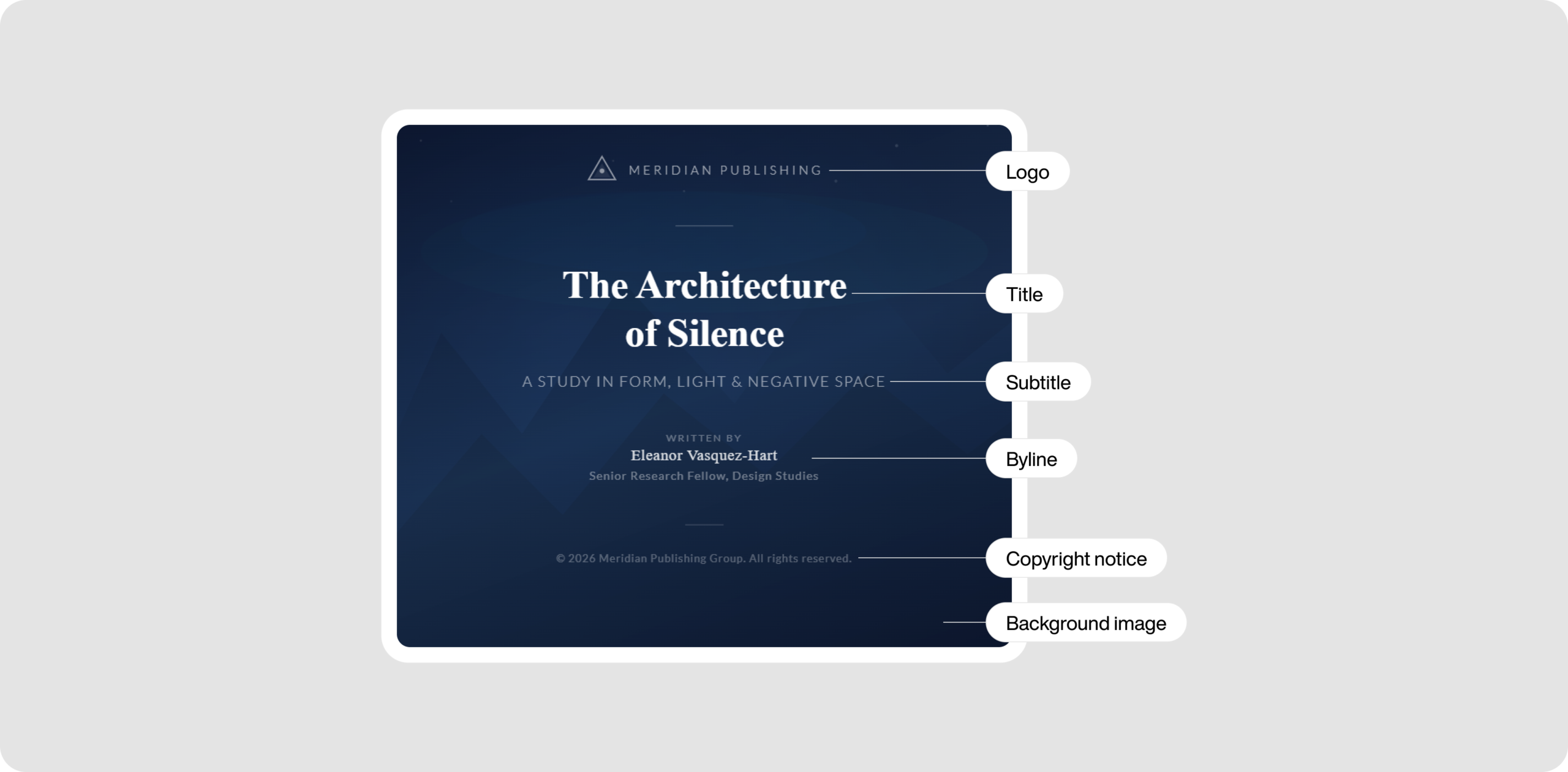
Along with defining the formatting and layout specifications of a publication, the Publishing Model maps all formatting rules to the Content Model elements. It also maps publishing types to include in the Taxonomy Design. Finally, publications are organized into a Content Plan.
Use AI to Do It Faster: Point your AI at a publication and have it scan and define all its elements, along with design parameters.
3. Define the Content Model
The Content Model defines how to use structured authoring elements as defined in an XML schema. It should be included in any templates you use. The model describes the content types to include in the Taxonomy Design, as well as the elements to include in the Reuse Model and the Content Standards.
Content teams with a strong content model can quickly create quality, structured content that follows your defined standards. When authors understand these rules, they work more efficiently and ensure the end user benefits from the design.
Use AI to Do It Faster: Use AI to map the elements defined in the Publishing Model and the Content Audit to the elements in the Content Model and Taxonomy Design. The AI can quickly review the contents of these models and transfer the required information to the next set.
4. Develop the Taxonomy Design
The Taxonomy Design blueprints the categories you plan to use in the CCMS. This is a hierarchical set of categories and the criteria for using each.
A taxonomy starts with a top-level category (also called the root category), which provides high-level criteria for when to apply the category or one of its child categories (typically, there are up to four child categories). Each child is a more refined version of its parent.
Common categories include Audience, Product, System/Tool, and Information Type, and can get very large and complex for large publication sets. The Taxonomy Design also tells you the attributes and values to use in the Metadata.
Use AI to Do It Faster: Point your AI at your Content Audit to get a starting Taxonomy. Then have it scan the contents of your publications to recommend additional elements to include in the design.
5. Implement Content Management
You store and manage your publications in a content management system, in this case, your CCMS. The content team works with the CCMS and needs to understand its structure. In some cases, this will be a folder structure. In others, it’s a flat structure that uses metadata (or a filter/sort option) using established values.
Taxonomy and metadata are closely related and should share many of the same names. The best way to think of the two is that taxonomy is the blueprint, and metadata is its practical application.
Your Content Model and Taxonomy Design tell you the metadata values to apply to each content item.
Use AI to Do It Faster: Use AI to apply metadata based on the criteria you define in your taxonomy design. Your CCMS should include AI capabilities for adding metadata to content items as they are added or updated.
6. Build the Reuse Model
The Reuse Model defines the rules and guidelines for reusing content. Reuse is common when following a structured content model and using a CCMS. For example, you can use a piece of content in multiple publications, use a component (a combination of content elements) in multiple publications, or you can apply profiling and variable sets.
Reuse rules are important because reuse requires consistency to avoid content duplication. They also ensure the content team can effectively manage reused content sets.
Use AI to Do It Faster: Use AI to review your Content Audit, Publishing Model, Content Model, and Taxonomy Design, pulling the information together to establish reuse rules for your CCMS.
7. Create the Content Plan
Everything you have created so far leads to the second last best practice: a Content Plan. Your Content Planner is responsible for creating a Content Plan that identifies the audience (who the content is for), content goals (for each audience), content requirements (what content is needed to achieve the content goals), and public requirements for new and updated content.
The Content Plan references the content in the CCMS that should appear in each publication, and a content workflow defines who will create the content, review it for adherence to writing standards and technical accuracy, and any final review needed before the publication is released.
Use AI to Do It Faster: You can use AI to help you build out content plans. Point the AI at the content already in your CCMS and in your Content Audit, and have it build a plan. You can also use AI to automate the assignment and management of content in your workflow.
8. Document the Content Standards
The final best practice is to create content standards. Take every best practice you have completed so far and put them all together to define the rules authors, editors, and reviewers need to follow to create good content.
Consider this a living document that gets updated regularly as your organization’s documentation needs evolve. Make it a requirement to review the content standards every quarter so the information is always fresh in your content team’s mind. Also consider including checklists for each best practice and for key use cases to help writers and editors work more efficiently.
Use AI to Do It Faster: AI is very good at compiling and collating information. Give it access to all your Best Practice Models and have it create a document that pulls everything together in an easy-to-understand set of rules and guidelines.
Don’t Forget the Governance Model
Underlying all the best practices we’ll discuss is the concept of governance. A governance model helps you map out who is involved in developing and supporting each best practice. It is necessary to ensure the best practices continue to meet the needs of your organization.
As your organization’s needs change, you’ll need to review your best practices and make any changes needed. You should also periodically review how the content team manages content. You can offer suggestions to improve how they work or identify improvements to the CCMSis configuration and administration.
To help you create this map of roles and responsibilities, create a RACI (responsible, accountable, consulted, informed) table like the following:
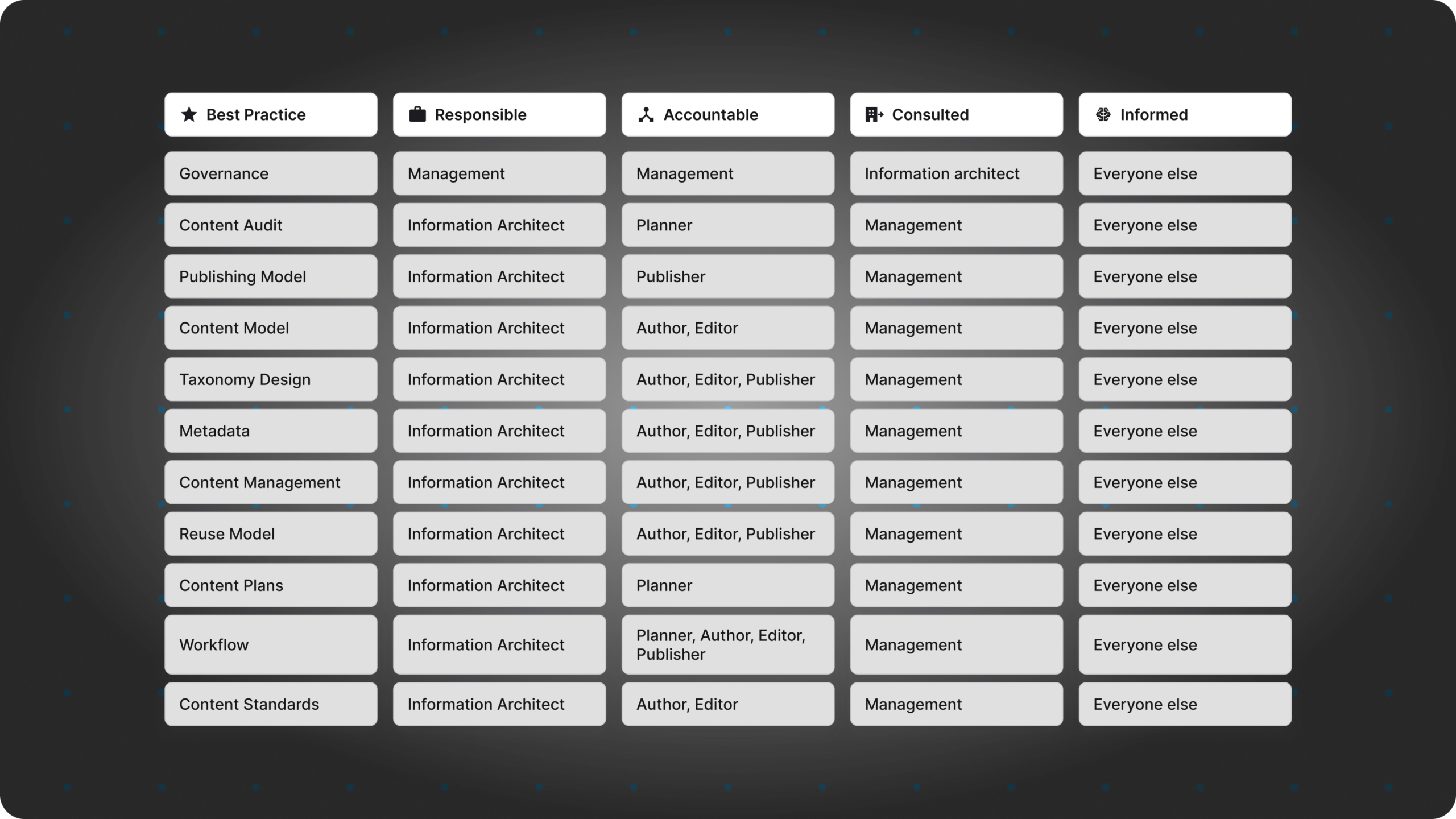
Note that each role may be supported by one or more people, and several roles could be owned by the same people. You may also call these roles by different names, so adjust the table as required.
Final Thoughts
We’ve covered the 8 best practices you need to follow to manage your content right in a CCMS. These practices help you design and implement a successful environment for managing all your formal knowledge. Can you operate a CCMS without the fine-tuning we discuss here? Yes, but to achieve maximum value, it’s important to configure it to meet your specific needs.
A well-planned and implemented CCMS helps reduce content duplication, lower translation costs, speed up migration to the CCMS, and get your publications to market faster. The AI suggestions can help you work faster and more efficiently, but remember to always review AI output and adjust where necessary.
Also, while the best practices we’ve shared here apply to using a CCMS, they can also be used to help you optimize the other tools mentioned above to some degree.
If you feel overwhelmed by the amount of work required to implement these best practices, consider taking a phased approach and start with one or two, such as the Content Audit and Content Model. Then build out to incorporate additional best practices.
Get started with Paligo
Paligo is built to meet the most demanding requirements, with plans made for any company from the growing SMB to the large Enterprise.
Get the Paligo Pulse once a month.
Stay ahead in structured content
Share
Author