How to Build a Winning Documentation Team Strategy


The role of a documentation team is to ensure that accurate and accessible information reaches employees, customers, and stakeholders when they need it. It might sound like it’s an easy job – writing, editing, and publishing – but there’s a lot more to a documentation team strategy than meets the eye.
These teams are critical to a company’s success. And giving them the best tools to complete their work? That’s where the magic happens.
Why Documentation Actually Matters (Beyond the Obvious)
Sure, everyone knows documentation is important. But let’s talk about what it really does for your business:
Customer support gets easier. User guides, FAQs, and help articles help customers solve their own problems. Fewer tickets for your support team, happier customers who found their answers quickly.
New employees get up to speed faster. Training materials and standard operating procedures can cut onboarding time in half. Instead of shadowing someone for weeks, new hires can reference clear, step-by-step guides.
You stay out of legal trouble. Proper documentation demonstrates compliance with regulations. It’s your shield against fines and penalties when auditors come knocking.
Operations run smoother when everyone follows the same documented procedures—you get consistent results across teams and locations. The numbers back this up as well: companies that enhance their knowledge bases often see a drop in support ticket volume of around 25–35%, and streamlined onboarding programs with centralized documentation can reduce ramp-up time by as much as 40–50%.
A company’s documentation includes product manuals, training manuals and e-learning, instructions for use, user guides (technical documentation), policies and procedures, compliance documentation, and much more.
What Documentation Teams Actually Do (Spoiler: It’s Not Just Writing)
Documentation teams handle way more than just putting words on paper. Here’s what they’re really juggling:
Working with subject matter experts (SMEs). They collect complex information from the people who know it best, then translate that expertise into something everyone can understand and follow.
Organizing information so people can find it. Ever tried to find something in poorly organized documentation? It’s painful. These teams create logical navigation and content structures that actually make sense.
Keeping everything consistent. Across dozens or hundreds of documents, they maintain the same voice, style, and format. They’re like the brand police, but for information.
Making sure you meet compliance requirements. Many industries have strict regulatory standards. Documentation teams ensure you can prove you’re following the rules when auditors arrive.
But here’s the thing – trying to do all this with basic tools like Word or Google Docs? It’s like trying to build a house with just a hammer.

Why Traditional Tools Don’t Cut It for Documentation Teams
You can technically manage documentation using spreadsheets, Word docs, or basic content management systems. But “technically possible” and “smart strategy” are two different things.
Collaboration becomes a nightmare. Ever had three people trying to edit the same document? Welcome to version conflict hell. Who made what changes? Which version is the “real” one?
Scaling becomes impossible. When you’re managing hundreds of documents across multiple products and teams, basic tools break down fast.
Consistency goes out the window. Without structured templates and automated formatting, every document starts looking different. Your brand guidelines become suggestions rather than standards.
Compliance becomes a guessing game. When audit time comes, can you prove who approved what changes and when? Traditional tools make this nearly impossible.
This is where Component Content Management Systems (CCMS) come in.
How CCMS Transforms Your Documentation Game
Think of a CCMS as a specialized platform built specifically for technical documentation teams. It’s designed around how documentation teams actually work, not how general office workers share files.
You create content once, use it everywhere. Instead of copying and pasting the same information across multiple documents (and forgetting to update it everywhere when it changes), you create reusable components that automatically update across all publications.
Multiple formats from one source. Need a PDF manual, HTML website, and mobile-friendly version? The CCMS generates all formats from your single source of content.
Everything stays organized automatically. The system tracks relationships between content pieces, so you always know what’s connected to what.
But the real magic happens in three key areas:
Collaboration That Actually Works
Remember those version conflicts we mentioned? CCMS solves that.
Multiple people can work on the same document simultaneously. No more “wait, let me finish this section first” or mysterious, conflicting changes that break everything. True collaboration.
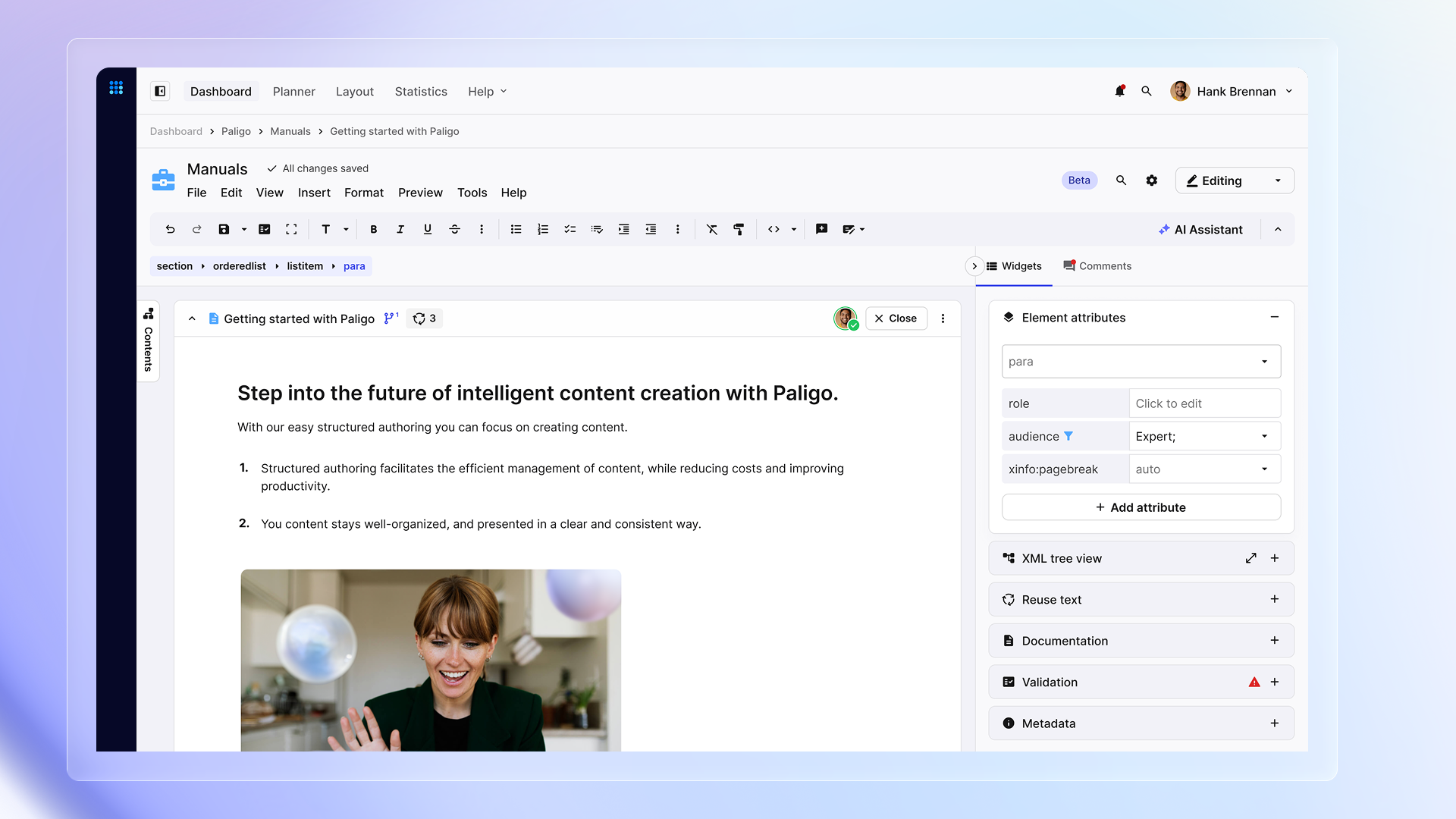
You can assign specific pieces to specific people. In Paligo CCMS, for example, you can assign someone to work on a particular section with start and end dates, along with instructions on exactly what they should focus on.
Workflows that keep everyone on track. Set up automatic processes that move content through planning, writing, review, approval, and publication stages. No more wondering “whose turn is it now?”
You can see progress in real-time. Project managers can spot bottlenecks before they become problems and adjust resources accordingly. Paligo customers report improved workflow efficiency, with content creation becoming 26% faster while maintaining quality throughout the process.
Version Control That Makes Sense
Here’s where a CCMS really shines. Version control goes way beyond just tracking changes.
Complete change history for everything. Every modification gets recorded with who made it, when, and why. Need to see what changed between last Tuesday and today? Easy.
Branching lets you work on multiple versions safely. Working on documentation for a future product release while maintaining current docs? Create a branch. Translating content for different markets? Branch it. Testing new layouts? You get the idea.
Merging brings everything back together cleanly. When you’re ready to combine changes from different branches, the system handles the technical details while keeping track of what came from where.
Rolling back saves you when things go wrong. Made a mistake? Just revert to the previous version. No hunting through backup files or trying to remember what you changed.
All of this creates an audit trail that compliance teams love, making collaboration much less stressful.
Roles and Permissions That Reflect Real Work
Not everyone on your documentation team needs the same level of access. A CCMS lets you match permissions to actual responsibilities.
Writers get full content creation access. They can create, edit, and manage their assigned content areas.
Reviewers can comment without accidentally breaking things. Subject matter experts can provide feedback and suggestions without worrying they’ll mess up formatting or delete something important.
Different experience levels get appropriate access. Junior writers work on specific sections with oversight, while senior writers handle complex technical content independently.
External contributors stay in their lane. Need a consultant to review technical accuracy? Give them comment-only access to relevant sections.
Managers get the oversight they need. Project leads can track progress, assign work, and manage approvals without getting bogged down in content details.
This granular control means everyone can focus on their expertise without stepping on each other’s toes.
What This Looks Like in Practice
Paligo’s official customer insights (2024) show that organizations that implement a CCMS typically see:
- 75% ROI: 75% of customers say Paligo delivers measurable ROI by optimizing time, money, and personnel resources.
- 50% Productivity Boost: 50% of users save at least 25% of their time — averaging 10 hours saved per week.
- 60% Scalability & Collaboration: 60% of customers report improved workflow efficiency, with content creation 26% faster than before.
But the real win? Your documentation team can focus on creating great content instead of fighting with tools and processes.
Getting Started: What You Need to Know
- Implementation: This phase includes system setup, migrating existing content, training your team, and optimizing workflows. The length of this stage depends on the volume and complexity of your content.
- Training: Teams need to learn structured authoring concepts and new workflows. Most organizations see productivity gains soon after adoption, as reusable components reduce duplication.
- Integration: Modern CCMS platforms connect with knowledge bases, CDPs, and support platforms through APIs, which helps accelerate adoption and ensures information flows seamlessly across systems.
- ROI: Benefits show up through reduced content creation time, improved consistency, and easier compliance, with Paligo customers reporting measurable ROI in time, money, and resource savings.
Common Questions About CCMS Implementation
What exactly is a Component Content Management System?
A CCMS is specialized software for creating, managing, and publishing technical documentation using structured content and automated workflows. Think of it as a platform built specifically for how documentation teams work, rather than adapted from general office tools.
How does this improve team collaboration?
CCMS enables simultaneous editing without conflicts, automated workflow management, role-based permissions, and real-time progress tracking. Multiple people can work on the same document without stepping on each other.
What makes version control better than what we have now?
You get comprehensive change tracking, branching capabilities for parallel work, automated merging, and complete audit trails. No more wondering who changed what or trying to merge conflicting versions manually.
Can it work with our existing business systems?
Yes, modern CCMS platforms integrate with CRM systems, product management tools, customer support platforms, and content distribution networks through APIs and connectors.
What kind of return can we expect on this investment?
Organizations typically see ROI within 6-12 months through reduced content creation time, improved quality consistency, and enhanced compliance capabilities. The productivity gains add up quickly.
How much training will our team need?
Documentation teams need training in structured authoring concepts, CCMS platform features, workflow optimization, and collaborative editing best practices. Most teams are productive within 2-4 weeks of implementation.
Will this help us meet regulatory requirements?
CCMS supports compliance through automated audit trails, role-based access controls, systematic review workflows, and comprehensive change documentation for regulatory reporting. It’s designed with compliance in mind.
Next Steps: Making the Move
Documentation strategy success comes down to having skilled teams equipped with the right tools. A CCMS provides the technological foundation for exceptional documentation team performance while supporting long-term organizational growth.
The documentation teams that thrive are the ones that stop fighting their tools and start focusing on creating great content.
Ready to see how this works in practice? A demo can show you exactly how a CCMS enhances the effectiveness and operational efficiency of your documentation team.
Looking to dive deeper into building a documentation culture? Learn more about systematic CCMS implementation and team development approaches that create lasting success.
Stay ahead in structured content
Get the Paligo Pulse once a month.

Share
Author